› Sviluppare funzionalita su Microsoft Office con VBA › macro per incollare oltre 2000 file csv
-
AutoreArticoli
-
#1
Raga buonasera a tutti,
ho urgenza di avere una macro che mi permetta di incollare in un unico foglio il contenuto di oltre 2000 file csv. Nel foglio di riepilogo è necessario che appaia, nella prima o nella ultima colonna, anche il nome del file. Vi allego quanto da incollare e quello di cui necessito.
Grazie a tuttiAllegati:
You must be logged in to view attached files.No PATEL, ho provato a fare la macro (ti allego il listato) ma ci sono degli errori nel ricopiare il contenuto dei file csv e ripete l'intestazione di ogni file
Option Explicit'----------->>
Public Sub Tester()
Dim FSO As Object
Dim oFile As Object
Dim oFiles As Object
Dim oFolder As Object
Dim srcWb As Workbook, destWB As Workbook
Dim srcSH As Worksheet, destSH As Worksheet
Dim srcRng As Range, destRng As Range
Dim arrIn() As Variant, arrHeaders() As Variant
Dim iCtr As Long, jCtr As Long, pCtr As Long
Dim i As Long, j As Long
Dim LRow As Long, iCols As Long
Dim sName As String, sPercorso As String, sStr As String
Dim bDimmed As BooleanConst sSummary As String = "Riepilogo"
Const sNameType As String = "*.csv"With Application
sStr = .DefaultFilePath & .PathSeparator
End WithsPercorso = GetFolder(sStr)
If sPercorso = vbNullString Then
Call MsgBox( _
Prompt:="Non hai selezionato una Directory - Riprova!", _
Buttons:=vbInformation, _
Title:="REPORT")
Exit Sub
End IfSet destWB = ThisWorkbook
With destWB
On Error Resume Next
With Application
.ScreenUpdating = False
.DisplayAlerts = False
.Sheets(sSummary).Delete
.DisplayAlerts = True
Err.Clear
End WithOn Error GoTo XIT
Set destSH = destWB.Sheets.Add(after:=.Sheets(.Sheets.Count))
End WithdestSH.Name = sSummary
Set FSO = CreateObject("Scripting.FileSystemObject")
Set oFolder = FSO.GetFolder(sPercorso)Set oFiles = oFolder.Files
For Each oFile In oFiles
With oFile
If .Name Like sNameType Then
Call Crea_Csv_Query(.Path, .Name)
Set srcSH = ActiveSheet
With srcSH
LRow = LastRow(srcSH, .Columns("A:A"))
Set srcRng = .UsedRange
jCtr = iCtr
iCtr = iCtr + LRowIf Not bDimmed Then
iCols = srcRng.Columns.Count
bDimmed = True
End If
End WithReDim Preserve arrIn(1 To iCols + 1, 1 To iCtr)
For i = 1 To LRow - 1
For j = 1 To iCols
arrIn(j, jCtr + i) = srcRng.Cells(i, j).Value
Next j
arrIn(j, jCtr + i) = oFile.Name
Next i
pCtr = pCtr + 1
' srcWb.Close savechanges:=False
Call Cancella_Query
End If
End With
Next oFileIf Not CBool(pCtr) Then
Call MsgBox( _
Prompt:="Nessun file del tipo designato (" & sNameType _
& ") è stato trovato ", _
Buttons:=vbInformation, _
Title:="REPORT")
Exit Sub
End IfWith destSH
Set destRng = destSH.Range("A2").Resize(iCtr, j)
destRng.Value = Application.Transpose(arrIn)
.UsedRange.EntireColumn.AutoFit
End WithCall MsgBox( _
Prompt:=pCtr & Space(1) & " file del tipo " _
& Split(sNameType, ".")(1) _
& " sono stati importati nel foglio " _
& sSummary, _
Buttons:=vbInformation, _
Title:="REPORT")XIT:
Application.ScreenUpdating = True
If Err.Number = 0 Then
Exit Sub
ElseIf Err.Number = 76 Then
Call MsgBox( _
Prompt:="il percorso " & sPercorso & " non e` valido!" _
& vbNewLine & vbNewLine _
& "controlla il percorso!", _
Buttons:=vbCritical, _
Title:="REPORT")
Exit Sub
Else
Call MsgBox( _
Prompt:="Errore " & Err.Number _
& vbNewLine & Err.Description, _
Buttons:=vbCritical, _
Title:="REPORT")
Exit Sub
End If
End Sub'--------->>
Public Function GetFolder(sPath As String) As String
Dim oFileDialog As FileDialog
Dim sStr As StringSet oFileDialog = Application.FileDialog(msoFileDialogFolderPicker)
With oFileDialog
.Title = "Seleleziona una Directory"
.AllowMultiSelect = False
.InitialFileName = sPath
If .Show <> -1 Then
GoTo XIT
End If
sStr = .SelectedItems(1)
End With
XIT:
GetFolder = sStr
Set oFileDialog = Nothing
End Function'--------->>
Public Sub Crea_Csv_Query(sFullName As String, sName As String)
With ActiveSheet.QueryTables.Add( _
Connection:="TEXT;" & sFullName, _
Destination:=Range("$A$1"))
.Name = sName
.FieldNames = True
.RowNumbers = False
.FillAdjacentFormulas = False
.PreserveFormatting = True
.RefreshOnFileOpen = False
.RefreshStyle = xlInsertDeleteCells
.SavePassword = False
.SaveData = True
.AdjustColumnWidth = True
.RefreshPeriod = 0
.TextFilePromptOnRefresh = False
.TextFilePlatform = 1252
.TextFileStartRow = 1
.TextFileParseType = xlDelimited
.TextFileTextQualifier = xlTextQualifierDoubleQuote
.TextFileConsecutiveDelimiter = False
.TextFileTabDelimiter = False
.TextFileSemicolonDelimiter = False
.TextFileCommaDelimiter = True
.TextFileSpaceDelimiter = False
.TextFileColumnDataTypes = Array(1, 1, 1, 1, 1, 1, 1)
.TextFileTrailingMinusNumbers = True
.Refresh BackgroundQuery:=False
End With
End Sub'--------->>
Public Sub Cancella_Query()
With ActiveSheet
.QueryTables(1).Delete
.UsedRange.ClearContents
End With
End Sub'--------->>
Public Function LastRow(SH As Worksheet, _
Optional Rng As Range, _
Optional minRow As Long = 1)
If Rng Is Nothing Then
Set Rng = SH.Cells
End IfOn Error Resume Next
LastRow = Rng.Find(What:="*", _
after:=Rng.Cells(1), _
Lookat:=xlPart, _
LookIn:=xlFormulas, _
SearchOrder:=xlByRows, _
SearchDirection:=xlPrevious, _
MatchCase:=False).Row
On Error GoTo 0
If LastRow < minRow Then
LastRow = minRow
End If
End Function'--------->>
Public Function IsArrayAllocated(Arr As Variant) As Boolean
On Error Resume Next
IsArrayAllocated = IsArray(Arr) And _
Not IsError(LBound(Arr, 1)) And _
LBound(Arr, 1) <= UBound(Arr, 1)
End Function
'<<=========Scusa se te lo dico, ma invece di allegare il file Xlsx ed il listato, ci faresti un favore se ci allegassi il file Xlsm!!!
Almeno potremmo testare subito l'errore che ti da e vedere se e come intervenire!
Concordo in linea di massima cmq con Patel: il forum non è una "Free Software House"!
Ci si aiuta x cercare di crescere tutti!
Buona serata (con CoronaVirus)!
Paolo
Buonasera a Te PMC77,
ti allego questo file appena testato non riesco però a far apparire, nella prima o ultima colonna, il nome del file di riferimento
Allegati:
You must be logged in to view attached files.ora va meglio, prova questa
Dim wsMerge As Worksheet Dim RowInsert As Long Sub Merge_Files() Const FolderPath As String = "" Dim Files As String Dim wbTemp As Workbook Dim LastRow As Long Set wsMerge = ThisWorkbook.Worksheets("Merge") Call ClearMergeWorksheet RowInsert = 2 Files = Dir(FolderPath + "*.csv") Application.DisplayAlerts = False Do Until Files = "" Set wbTemp = Workbooks.Open(Files) With wbTemp.Worksheets(1) LastRow = .Cells(Rows.Count, "A").End(xlUp).Row .Range("A2:G" & LastRow).Copy '<<<<<<<<<<<<<<<<<< wsMerge.Range("A" & RowInsert).PasteSpecial xlPasteValues wsMerge.Range("H" & RowInsert) = Files '<<<<<<<<<<<<<<<<<< wbTemp.Close False RowInsert = RowInsert + LastRow - 1 End With Files = Dir() Loop Application.DisplayAlerts = True MsgBox "File Merge Complete", vbInformation End Sub Private Sub ClearMergeWorksheet() Dim LastRow As Long With wsMerge LastRow = .Cells(Rows.Count, "A").End(xlUp).Row If 2 > LastRow Then Exit Sub .Range("A2:N" & LastRow).ClearContents End With End Subse ho capito, inserisci queste righe di codice
nome = Workbooks.Open(Files).Name '<<<---Nome del file csv
Do Until Files = ""Set wbTemp = Workbooks.Open(Files)
dopo
wsMerge.Range("A" & RowInsert).PasteSpecial xlPasteValues
wsMerge.Range("a1") = nome' devi modificare il valore della cellaQual è il punto di avere gusti diversi, se non mostrare che i cervelli lavorano diversamente, che pensiamo diversamente? ( Alan Turing)
Sempre il mare, uomo libero, amerai!
( Charles Baudelaire )Buongiorno Patel e grazie di cuore per l'aiuto.
Rimane un problema però, il nome del file appare solo nella prima riga si pone quindi la necessità successiva di copiarlo, trascinandolo, per le successive righe fino all'inizio del nome del file successivo.
Puoi aiutarmi?
Grazie di vero cuore
Allegati:
You must be logged in to view attached files.Beh, questa è facile!
Fai un ciclo while su tutte le righe del foglio parcheggiandoti il valore precedente e copiandolo sulle celle successive vuote e quando ne trovi una che contiene qualcosa diventa lei il valore precedente!
Paolo
Buongiorno Paolo,
dove sbaglio?
Sub Test1()
Dim x As Integer
' Set numrows = number of rows of data.
NumRows = Range("H2", Range("H2").End(xldown)).Rows.Count
' Select cell a1.
Range("H2").Select
' Establish "For" loop to loop "numrows" number of times.
For x = 1 To NumRows
' Insert your code here.
' Selects cell down 1 row from active cell.
ActiveCell.Offset(1, 0).Select
Next
End SubAllegati:
You must be logged in to view attached files.Scusa, ma sta roba l'hai scritta tu?
Io metterei "H" e non "H2"
Poi manca il discorso controllo cella vuota/cella con valore...
In effetti...
Però come si può pensare di "pasticciare" in VBA senza averne le conoscenze?
tanta buona volontà di cercare e copiare ma poca di studiare, basta sostituire la riga
wsMerge.Range("H" & RowInsert) = Files
con
wsMerge.Range("H" & RowInsert & ":H" & RowInsert + LastRow - 1).Value = Files
Scusandomi, per la mia scarsa competenza ringrazio sentitamente PATEL.
Ancora grazie di vero cuore
Buonasera Patel,
purtroppo la macro, nonostante l'indicazione da te fornitami , non funziona e si blocca ripetutamente.
Se puoi aiutarmi te ne sono grato
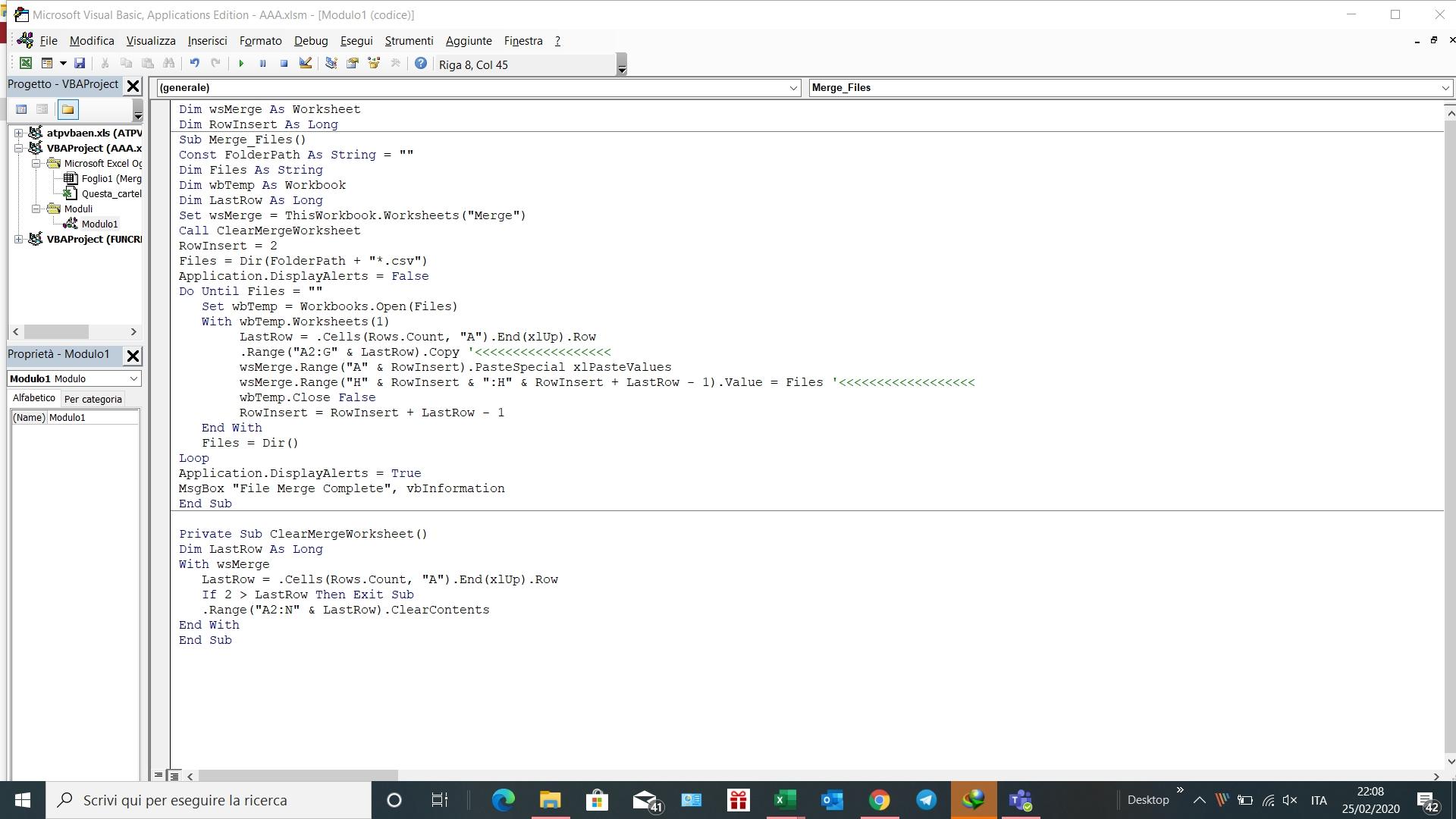
spiegati meglio, non funziona mai ? funziona per qualche file e poi si blocca ?
prova così
Dim wsMerge As Worksheet Dim RowInsert As Long Sub Merge_Files() Const FolderPath As String = "" Dim Files As String Dim wbTemp As Workbook Dim LastRow As Long Set wsMerge = ThisWorkbook.Worksheets("Merge") Call ClearMergeWorksheet RowInsert = 2 Files = Dir(FolderPath + "*.csv") Application.DisplayAlerts = False Application.ScreenUpdating = False Application.DisplayStatusBar = False Application.EnableEvents = False Do Until Files = "" Set wbTemp = Workbooks.Open(Files) With wbTemp.Worksheets(1) LastRow = .Cells(Rows.Count, "A").End(xlUp).Row .Range("A2:G" & LastRow).Copy wsMerge.Range("A" & RowInsert).PasteSpecial xlPasteValues ' wsMerge.Range("H" & RowInsert) = Files wsMerge.Range("H" & RowInsert & ":H" & RowInsert + LastRow - 1).Value = Files wbTemp.Close False RowInsert = RowInsert + LastRow - 1 End With Files = Dir() Loop Application.DisplayAlerts = True Application.DisplayAlerts = True Application.ScreenUpdating = True Application.DisplayStatusBar = True Application.EnableEvents = True MsgBox "File Merge Complete", vbInformation End SubBuongiorno Patel,
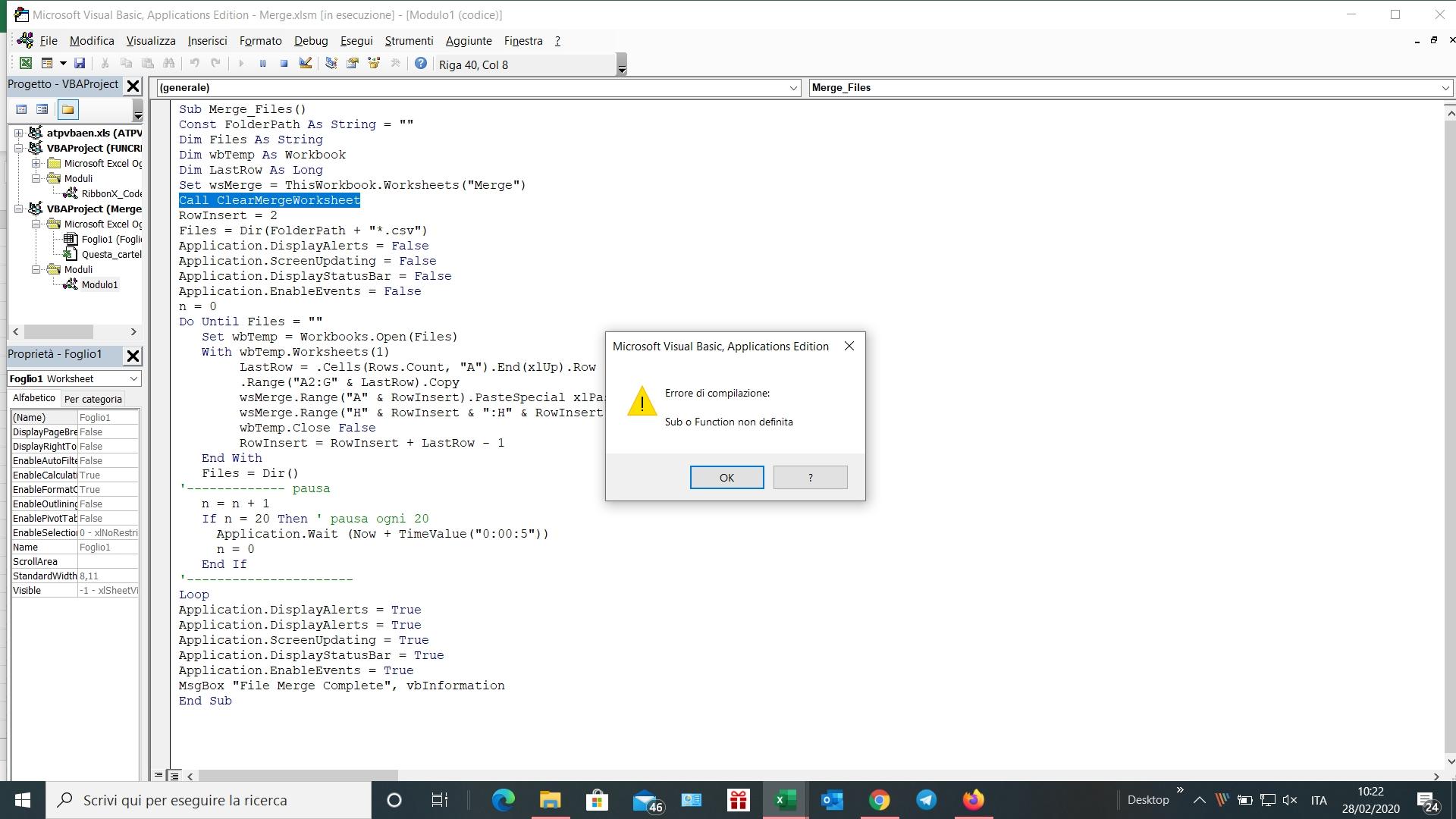
ho ricopiato il tuo codice ma ci sono problemi di funzionamento come da allegato (errore alla linea Call ClearMergeWorksheet)
A chiarimento di quanto scritto ieri, preciso quanto segue:
- dopo meno di 50 files csv (su 2500) copiati si è bloccato, riavviato si è bloccato nuovamente
- una volta avviata la macro in caso di errore non è possibile riavviare la macro
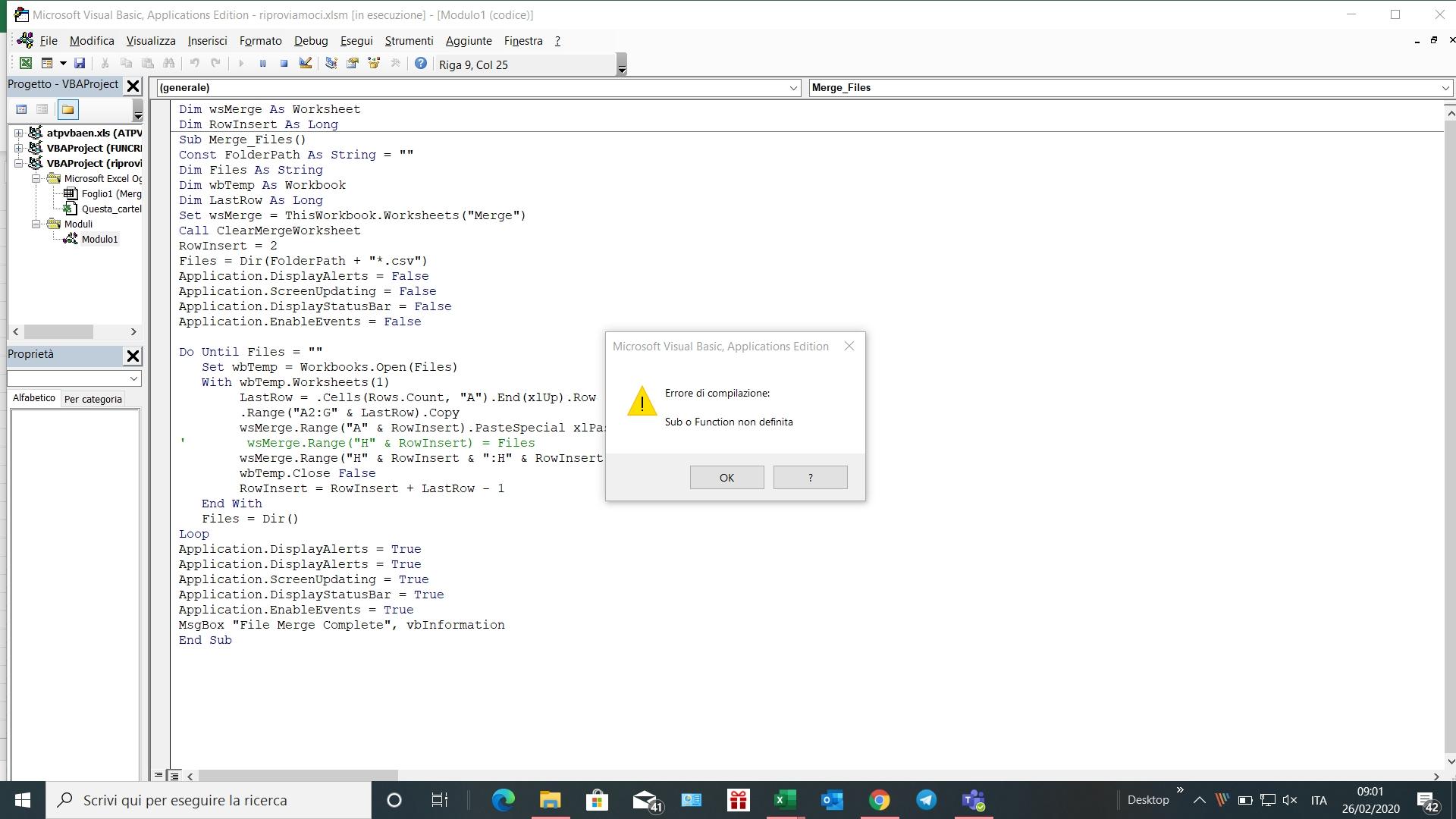
proviamo a inserire una pausa oni 20 file in modo da aspettare che i file vengano tutti chiusi, ovviamente il ciclo verrà molto rallentato, se così funziona puoi provare ad modificare la pausa per velocizzare
Sub Merge_Files() Const FolderPath As String = "" Dim Files As String Dim wbTemp As Workbook Dim LastRow As Long Set wsMerge = ThisWorkbook.Worksheets("Merge") Call ClearMergeWorksheet RowInsert = 2 Files = Dir(FolderPath + "*.csv") Application.DisplayAlerts = False Application.ScreenUpdating = False Application.DisplayStatusBar = False Application.EnableEvents = False n = 0 Do Until Files = "" Set wbTemp = Workbooks.Open(Files) With wbTemp.Worksheets(1) LastRow = .Cells(Rows.Count, "A").End(xlUp).Row .Range("A2:G" & LastRow).Copy wsMerge.Range("A" & RowInsert).PasteSpecial xlPasteValues wsMerge.Range("H" & RowInsert & ":H" & RowInsert + LastRow - 1).Value = Files wbTemp.Close False RowInsert = RowInsert + LastRow - 1 End With Files = Dir() '------------- pausa n = n + 1 If n = 20 Then ' pausa ogni 20 Application.Wait (Now + TimeValue("0:00:5")) n = 0 End If '---------------------- Loop Application.DisplayAlerts = True Application.DisplayAlerts = True Application.ScreenUpdating = True Application.DisplayStatusBar = True Application.EnableEvents = True MsgBox "File Merge Complete", vbInformation End SubE' cambiato qualcosa ? quanti file ora ti processa ? non puoi limitarti a dire che non funziona
Scusa Patel,
il problema che riscontro è già all'avvio della macro...la macro non parte e mi dà subito il messaggio di errore che ti ho allegato in precedenza
prima avevi detto che si fermava dopo aver caricato 50 file, non è che hai incollato solo quella che ti ho postato io e manca quella che cancella il foglio ?
Patel,
tutto ok sei veramente un GRANDE e ti ringrazio di vero cuore.
Come da tuo consiglio ho verificato l'istruzione Private Sub ClearMergeWorksheet() e ho riscontrato un mio errore di copia.
Ti chiedo scusa del tempo che ti ho fatto perdere e ti rinnovo i ringraziamenti per il grandissimo aiuto fornitomi. BUON WE

-
AutoreArticoli