
› Excel e gli applicativi Microsoft Office › Funzione ricorsiva VBA per strutturazione file Excel
-
AutoreArticoli
-
CIao
Ho trovato l'errore
prova così per favore.Option Explicit Sub Livelli() Dim Vettore() Dim NumeroLivelli As Integer Dim NumeroCelle As Integer Dim PrimaCella As Range Dim UltimaCella As Range Dim Intervallo As Range Dim CellaW As Range Dim Index As Integer Dim Index2 As Integer Dim LastLetter As String Dim LetterToUse As String Dim MaxN As Integer Dim NumZeri As String Set PrimaCella = Range("B2") If Range("C1") <> "Luca" Then Range("C1").EntireColumn.Insert Range("C1").Formula = "Luca" End If Set UltimaCella = PrimaCella.End(xlDown) Set Intervallo = Range(PrimaCella, UltimaCella) MaxN = 1 LastLetter = "A" NumeroCelle = Intervallo.Count NumeroLivelli = 0 For Each CellaW In Intervallo If CellaW > NumeroLivelli Then NumeroLivelli = CellaW End If Next CellaW ReDim Vettore(0 To NumeroLivelli, 0 To NumeroCelle, 1 To 2) For Index = 1 To NumeroCelle 'PrimaCella.Offset(Index - 1, 0).Select If Val(PrimaCella.Offset(Index - 1, 0)) = 0 Then Vettore(1, 0, 1) = 0 Vettore(0, Index, 1) = 0 Vettore(0, Index, 2) = Vettore(1, 0, 1) If Vettore(1, 0, 1) > MaxN Then MaxN = Vettore(1, 0, 1) End If ElseIf Val(PrimaCella.Offset(Index - 1, 0)) = 1 Then Vettore(1, 0, 1) = Vettore(1, 0, 1) + 1 Vettore(0, Index, 1) = "A" Vettore(0, Index, 2) = Vettore(1, 0, 1) If Vettore(1, 0, 1) > MaxN Then MaxN = Vettore(1, 0, 1) End If Else If Val(PrimaCella.Offset(Index - 1, 0)) > Val(PrimaCella.Offset(Index - 2, 0)) Then Vettore(PrimaCella.Offset(Index - 1, 0), 0, 1) = 1 LastLetter = LetterPlus1(LastLetter) Vettore(0, Index, 1) = LastLetter Vettore(PrimaCella.Offset(Index - 1, 0), 0, 2) = LastLetter Vettore(0, Index, 2) = 1 ElseIf Val(PrimaCella.Offset(Index - 1, 0)) < Val(PrimaCella.Offset(Index - 2, 0)) Then For Index2 = (PrimaCella.Offset(Index - 1, 0) + 1) To NumeroLivelli Vettore(Index2, 0, 1) = 0 Next Index2 Vettore(PrimaCella.Offset(Index - 1, 0), 0, 1) = Vettore(PrimaCella.Offset(Index - 1, 0), 0, 1) + 1 Vettore(0, Index, 2) = Vettore(PrimaCella.Offset(Index - 1, 0), 0, 1) If Vettore(PrimaCella.Offset(Index - 1, 0), 0, 1) = 0 Then LastLetter = LetterPlus1(LastLetter) LetterToUse = LastLetter Else LetterToUse = Vettore(PrimaCella.Offset(Index - 1, 0), 0, 2) End If Vettore(0, Index, 1) = LetterToUse 'Vettore(PrimaCella.Offset(Index - 1, 0), 0, 1) = Vettore(PrimaCella.Offset(Index - 1, 0), 0, 1) + 1 If Vettore(PrimaCella.Offset(Index - 1, 0), 0, 1) > MaxN Then MaxN = Vettore(PrimaCella.Offset(Index - 1, 0), 0, 1) End If Else Vettore(PrimaCella.Offset(Index - 1, 0), 0, 1) = Vettore(PrimaCella.Offset(Index - 1, 0), 0, 1) + 1 Vettore(0, Index, 1) = Vettore(PrimaCella.Offset(Index - 1, 0), 0, 2) 'Luca Vettore(0, Index, 2) = Vettore(PrimaCella.Offset(Index - 1, 0), 0, 1) If Vettore(PrimaCella.Offset(Index - 1, 0), 0, 1) > MaxN Then MaxN = Vettore(PrimaCella.Offset(Index - 1, 0), 0, 1) End If End If End If Next Index NumZeri = "" For Index = 1 To Len(MaxN) NumZeri = NumZeri & "0" Next Index For Index = 1 To NumeroCelle PrimaCella.Offset(Index - 1, 1) = Vettore(0, Index, 1) & Format(Vettore(0, Index, 2), NumZeri) Next Index MsgBox "Fatto" End Sub Function LetterPlus1(LetteraIniziale) Dim PosLet As Integer Dim VettoreLet ReDim VettoreLet(1 To Len(LetteraIniziale)) For PosLet = 1 To Len(LetteraIniziale) VettoreLet(PosLet) = Mid(LetteraIniziale, Len(LetteraIniziale) - PosLet + 1, 1) Next PosLet = 1 Do If VettoreLet(PosLet) < "Z" Then VettoreLet(PosLet) = Chr(Asc(VettoreLet(PosLet)) + 1) Exit Do Else VettoreLet(PosLet) = "A" PosLet = PosLet + 1 End If If PosLet > UBound(VettoreLet, 1) Then ReDim Preserve VettoreLet(1 To PosLet) VettoreLet(PosLet) = Chr(Asc("A") - 1) End If Loop LetterPlus1 = "" For PosLet = UBound(VettoreLet, 1) To 1 Step -1 LetterPlus1 = LetterPlus1 & VettoreLet(PosLet) Next End Function Sub PrintVect(Vect) Dim Ii1 Dim Ii2 For Ii1 = 0 To UBound(Vect, 1) For Ii2 = 0 To UBound(Vect, 2) Range("D1").Offset(Ii2, Ii1) = Vect(Ii1, Ii2, 1) Range("D1").Offset(Ii2, -1) = Vect(0, Ii2, 2) Next Range("D1").Offset(UBound(Vect, 2) + 1, Ii1) = Vect(Ii1, 0, 2) Next End Sub Sub MIaprova() Dim pippo pippo = LetterPlus1("ZAZ") MsgBox pippo End Sub@ VF in realtà se dovessi ripartire ora userei una matrice 2 dimensioni (senon sbaglio 3 colonne e un numero di righe pari al numero di elementi) e un vettore con un numero di elementi pari al livello.
In effetti molte "colonne" (seconda dimensione) della matrice non vengono utilizzate se non con il primo indice uguale a 0.
In effetti sono partito da un flow chart solo sbozzato.
La difficoltà nasce principalmente dal fatto che devi esaurire ogni ramo dell'albero aumentando i codici delle foglie, poi quando passi al ramo successivo devi ricordare il codice alfabetico dell'ultima foglia del ramo precedente e ripartire da lì, ma con una numerazione indipendente e relativa soltanto al ramo corrente. Non mi ci sono applicato, ma forse una funzione ricorsiva alleggeriva il codice, aumentando però la difficoltà di lettura.
Ok...in effetti @luca il problema sembra essere risolto. Farò altri test per verificare e cercare di capire bene il tuo meccanismo di salvataggio dei dati. Io nel mio approccio, utilizzavo i dati già salvai nelle colonne, nel processo però mi perdevo.
@vecchio frac sicuramente hai ragione, la ricorsività peggiorava il tutto...
Ciao
@ Jotric come avrai visto il pio programmino ora ti scrive in una colonna a fianco.
Questo è utile per fare il debug. Se vuoi sovrascrivere basta cambiare la riga dis crittura ed eliminare l'aggiunta della colonna.
@ VF. la difficoltà maggiore sta nel fatto che si usano lettere sequenziali per diversi livelli. Pertanto non è proprio uno schema di elenco a cascata in cui ad ogni livello corrisponde una struttura.
io personalemnte avrei fatto qualcosa si quattro livelli del tipo
A.a.i.1 dove
la prima lettera diventerà A,B,C..Z..AA....
la seconda a,b,c,...zz, aa, ab, ...
la terza i, ii, iii, iv, (numeri romani) e qui forse era più incasinato
la quarta numeri sequenziali
O qualcosa del genere.
Ciao Luca
@luca73, sei stato un guru e hai risolto il problema alla grande. Adesso devo sistemare delle cose...In realtà il file excel viene passato, una volta elaborato ad un altro software che lo carica per la gestione. Per esempio le lettere "I" ed "O" non devono essere usate. Oppure dopo la "Z" non viene "AA", ma "ZA"...e dopo "ZZ" viene "ZZA".
Poi, i numeri nel livello in realtà vanno presi dalla colonna "A" prima del "-". Ed infine affianco al livello letterale devo inserire il codice dell'oggetto padre...Insomma adesso ci devo lavorare un pò...

Ciao VF era solo per dire e fare un esempio. Ho usato 4 in quanto ho visto che di solito ci sono 4 livelli. Era solo per dire che per fare un albero avrei impostato diversamente. Ora capisco che però ci sono vincoli di passaggio da un programma ad um altro.
Ciao a tutti
ho provato a semplificare e razionalizzare la macro.
Inoltre ho provato ad includere la richiesta di modifica delle lettere
ecco il risultato.
Sub Livelli02() Dim VettoreLivelli() Dim VettoreMaxLettera() Dim NumeroLivelli As Integer Dim NumeroCelle As Integer Dim PrimaCella As Range Dim UltimaCella As Range Dim Intervallo As Range Dim CellaW As Range Dim Index As Integer Dim Index2 As Integer Dim LastLetter As String Dim MaxN As Integer Dim NumZeri As String Dim LivelloW As Integer Dim LivelloP As Integer Set PrimaCella = Range("B2") If Range("C1") <> "Luca" Then Range("C1").EntireColumn.Insert Range("C1").Formula = "Luca" End If Set UltimaCella = PrimaCella.End(xlDown) Set Intervallo = Range(PrimaCella, UltimaCella) MaxN = 1 LastLetter = "A" LivelloP = 0 LivelloW = 0 NumeroCelle = Intervallo.Count NumeroLivelli = 0 For Each CellaW In Intervallo If CellaW > NumeroLivelli Then NumeroLivelli = CellaW End If Next CellaW ReDim VettoreLivelli(1 To NumeroCelle, 1 To 2) ReDim VettoreMaxLettera(0 To NumeroLivelli, 1 To 2) For Index = 1 To NumeroCelle PrimaCella.Offset(Index - 1, 0).Select LivelloW = Val(PrimaCella.Offset(Index - 1, 0)) If LivelloW = 0 Then VettoreMaxLettera(0, 1) = VettoreMaxLettera(0, 1) + 1 VettoreMaxLettera(0, 2) = "0" ElseIf LivelloW = 1 Then VettoreMaxLettera(LivelloW, 1) = VettoreMaxLettera(LivelloW, 1) + 1 VettoreMaxLettera(LivelloW, 2) = "A" Else If LivelloW > LivelloP Then LastLetter = LetterPlus1_01(LastLetter) VettoreMaxLettera(LivelloW, 1) = 1 VettoreMaxLettera(LivelloW, 2) = LastLetter ElseIf LivelloW < Val(PrimaCella.Offset(Index - 2, 0)) Then For Index2 = (LivelloW + 1) To NumeroLivelli VettoreMaxLettera(Index2, 1) = 0 Next Index2 If VettoreMaxLettera(LivelloW, 1) = 0 Then VettoreMaxLettera(LivelloW, 2) = LetterPlus1_01(LastLetter) Else VettoreMaxLettera(LivelloW, 2) = VettoreMaxLettera(LivelloW, 2) End If VettoreMaxLettera(LivelloW, 1) = VettoreMaxLettera(LivelloW, 1) + 1 Else VettoreMaxLettera(LivelloW, 1) = VettoreMaxLettera(LivelloW, 1) + 1 End If End If VettoreLivelli(Index, 1) = VettoreMaxLettera(LivelloW, 1) VettoreLivelli(Index, 2) = VettoreMaxLettera(LivelloW, 2) If VettoreMaxLettera(LivelloW, 1) > MaxN Then MaxN = VettoreMaxLettera(LivelloW, 1) End If LivelloP = LivelloW Next Index NumZeri = String$(Len(MaxN), "0") For Index = 1 To NumeroCelle PrimaCella.Offset(Index - 1, 1) = VettoreLivelli(Index, 2) & Format(VettoreLivelli(Index, 1), NumZeri) Next Index MsgBox "Fatto" End Sub Function LetterPlus1_01(LetteraIniziale) Dim PosLet As Integer Dim VettoreLet ReDim VettoreLet(1 To 2) VettoreLet(1) = Left(LetteraIniziale, Len(LetteraIniziale) - 1) VettoreLet(2) = Right(LetteraIniziale, 1) PosLet = 1 If VettoreLet(2) < "Z" Then VettoreLet(2) = Chr(Asc(VettoreLet(2)) + 1) If VettoreLet(2) = "I" Or VettoreLet(2) = "O" Then VettoreLet(2) = Chr(Asc(VettoreLet(2)) + 1) End If Else VettoreLet(2) = "A" VettoreLet(1) = "Z" & VettoreLet(1) End If LetterPlus1_01 = VettoreLet(1) & VettoreLet(2) End Function@luca 73...hai un secchio di birre pagate ovunque tu sia!
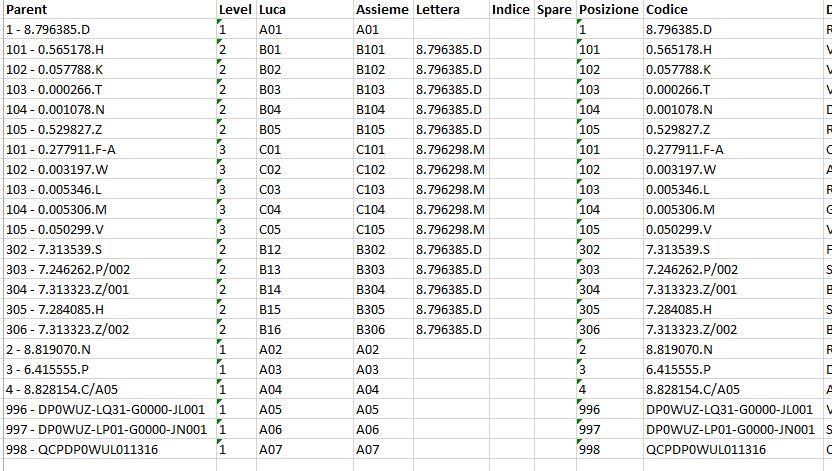
Ho risistemato questa tua ultima versione è funziona benissimo. Con il For che popola le celle ho sistemato il mio assieme composto da lettera e codice iniziale (quello che nella colonna "A" è preceduto dal segno "-"). Rimane solo un ultima cosetta...Come posso memorizzare il codice "padre"? Mi spiego..in una colonna separata devo inserire il codice (quello che nella colonna "A" segue il segno "-") che fa capo ai sottolivelli. Nel livello A1, tutti i livelli B avranno il codice di A1. Ti allego un immagine...
Ciao, sei fortunato, sono astemio,..

Prova apartire da questo (ora scrive in colonne R e S)
Sub PadreEFiglio()


Dim PrimaCellaPF As Range
Dim CellaWPF As Range
Dim IntervalloPF
Dim Results() As String

Set PrimaCellaPF = Range("A2")
Set IntervalloPF = Range(PrimaCellaPF, PrimaCellaPF.End(xlDown))


For Each CellaWPF In IntervalloPF
    On Error GoTo er_lt
    Results = Split(CellaWPF, "-")
    CellaWPF.Offset(0, 17) = Results(0)
    CellaWPF.Offset(0, 18) = Results(1)
Next CellaWPF
MsgBox "Finito"
Exit Sub
er_lt:
ReDim Results(0 To 1)
    Results(0) = CellaWPF
    Results(1) = ""
Resume Next
End Sub
@ VF split l'ho imparato da te vabene?
Ciao, sei fortunato, sono astemio,..
Io no, io no! Non ho fatto niente per il thread ma mi metto in coda 🙂

@ VF split l'ho imparato da te va bene?
Guarda che mi commuovo


Riguardo Split, ti aggiungo una piccola chicca:
Results = Split(CellaWPF, "-")
CellaWPF.Offset(, 17).Resize(, 2) = Results
equivale allo splittaggio esplicito (cioè non serve assegnare l'elemento zero e l'elemento uno di result perchè questo viene scompattato automagicamente, avendo ridefinito con resize l'area di destinazione)
@VF sei semplicemente un mito! Non so di dove sei, ma si combina....
@luca73...lo splittaggio lo avevo già risolto....quello che mi manca, come da immagine che ti ho allegato è il codice padre...Ovvero la colonna che al momento è chiamata "Lettera". Praticamente un codice padre è il riferimento per tutti i figli dello stesso livello. Un codice di un livello "A01" è padre di tutti i figli "B", se un livello "B" ha dei figli "C", allora "B" sarà padre di tutti i livelli "C", ecc...
Ciao Ho provato a buttare giu qualcosa.
Ora i dati:
- lettera
- numero sequenziale come da programma precedente
- numero sequenziale come da colonna A
- codice padre
sono scritti nelle 4 colonne di un vettore.
Io poi le ho fatte scrivere in unica colonna divise da "-" ma modificando le ultime righe puoi farne quello che vuoi.
Fammi sapere se ho capito quello che volevi.
Fanno due succhi alla Pera e uno all'ACE.

Sub Livelli03()
Dim VettoreLivelli()
Dim VettoreMaxLettera()
Dim NumeroLivelli As Integer
Dim NumeroCelle As Integer
Dim PrimaCella As Range
Dim UltimaCella As Range
Dim Intervallo As Range
Dim CellaW As Range
Dim Index As Integer
Dim Index2 As Integer
Dim LastLetter As String
Dim MaxN As Integer
Dim NumZeri As String
Dim LivelloW As Integer
Dim LivelloP As Integer
Dim Results() As String
Set PrimaCella = Range("B2")
If Range("C1") <> "Luca" Then
    Range("C1").EntireColumn.Insert
    Range("C1").Formula = "Luca"
End If
Set UltimaCella = PrimaCella.End(xlDown)
Set Intervallo = Range(PrimaCella, UltimaCella)

MaxN = 1
LastLetter = "A"
LivelloP = 0
LivelloW = 0

NumeroCelle = Intervallo.Count
NumeroLivelli = 0
For Each CellaW In Intervallo
    If CellaW > NumeroLivelli Then
        NumeroLivelli = CellaW
    End If
Next CellaW
ReDim VettoreLivelli(1 To NumeroCelle, 1 To 4) ' 1=numero, 2= lettera;3= codicepadre 4= codifica
ReDim VettoreMaxLettera(0 To NumeroLivelli, 1 To 3) ' 1=numero, 2= lettera;3= codice padre
ReDim Results(0 To 1)
For Index = 1 To NumeroCelle
PrimaCella.Offset(Index - 1, 0).Select
On Error GoTo er_lt
Results = Split(Cells(PrimaCella.Offset(Index - 1, 0).Row, 1), "-")
If UBound(Results, 1) < 1 Then
    ReDim Preserve Results(0 To 1)
    Results(1) = Results(0)
    Results(0) = ""
End If
LivelloW = Val(PrimaCella.Offset(Index - 1, 0))

    If LivelloW < NumeroLivelli Then
        VettoreMaxLettera(LivelloW + 1, 3) = Results(1)
    End If
    If LivelloW = 0 Then
        VettoreMaxLettera(0, 1) = VettoreMaxLettera(0, 1) + 1
        VettoreMaxLettera(0, 2) = "0"
        VettoreMaxLettera(0, 3) = ""
    ElseIf LivelloW = 1 Then
        VettoreMaxLettera(LivelloW, 1) = VettoreMaxLettera(LivelloW, 1) + 1
        VettoreMaxLettera(LivelloW, 2) = "A"
    Else

        If LivelloW > LivelloP Then
            LastLetter = LetterPlus1_01(LastLetter)
            VettoreMaxLettera(LivelloW, 1) = 1
            VettoreMaxLettera(LivelloW, 2) = LastLetter
        ElseIf LivelloW < Val(PrimaCella.Offset(Index - 2, 0)) Then
            For Index2 = (LivelloW + 1) To NumeroLivelli
                VettoreMaxLettera(Index2, 1) = 0
            Next Index2
            If VettoreMaxLettera(LivelloW, 1) = 0 Then
                VettoreMaxLettera(LivelloW, 2) = LetterPlus1_01(LastLetter)
            Else
                VettoreMaxLettera(LivelloW, 2) = VettoreMaxLettera(LivelloW, 2)
            End If
            VettoreMaxLettera(LivelloW, 1) = VettoreMaxLettera(LivelloW, 1) + 1
        Else
            VettoreMaxLettera(LivelloW, 1) = VettoreMaxLettera(LivelloW, 1) + 1
        End If
    End If
    VettoreLivelli(Index, 1) = VettoreMaxLettera(LivelloW, 1)
    VettoreLivelli(Index, 2) = VettoreMaxLettera(LivelloW, 2)
    VettoreLivelli(Index, 3) = VettoreMaxLettera(LivelloW, 3)
    VettoreLivelli(Index, 4) = Results(0)
    If VettoreMaxLettera(LivelloW, 1) > MaxN Then
        MaxN = VettoreMaxLettera(LivelloW, 1)
    End If
    LivelloP = LivelloW
Next Index
NumZeri = String$(Len(MaxN), "0")
For Index = 1 To NumeroCelle
    PrimaCella.Offset(Index - 1, 1) = VettoreLivelli(Index, 2) & "-" & Format(VettoreLivelli(Index, 1), NumZeri) & "-" & VettoreLivelli(Index, 3) & "-" & VettoreLivelli(Index, 4)
Next Index
MsgBox "Fatto"
Exit Sub
er_lt:
ReDim Results(0 To 1)
    Results(1) = Cells(PrimaCella.Offset(Index - 1, 0).Row, 1)
    Results(0) = ""
Resume Next
End Sub
Le funzioni sono le stesse di prima.
Ciao
Luca
Fanno due succhi alla Pera e uno all'ACE.
....fammi sapere qual'è il tuo bar abituale e ti faccio fornitura. Sei stato un mito! Grazie a tutti per il prezioso aiuto.
-
AutoreArticoli


